Crafting a weekly schedule with effective reminders is crucial for maximizing productivity and minimizing stress. This comprehensive guide explores the fundamentals of weekly scheduling, from understanding its benefits to implementing practical strategies for setting and managing reminders. Whether you’re aiming for enhanced personal organization or professional time management, this resource provides a roadmap for success.
We’ll delve into various scheduling techniques, including daily, block, and timeboxing methods. Different tools, from paper calendars to digital apps, will be evaluated, highlighting their advantages and disadvantages. Furthermore, we’ll cover essential reminder strategies, ensuring you never miss a crucial appointment or task. Finally, we’ll explore adapting schedules to individual needs and preferences, offering solutions for maintaining a consistent and effective schedule in the long term.
Understanding Weekly Scheduling

A well-structured weekly schedule is a cornerstone of productivity and effective time management. It provides a roadmap for achieving goals, both personal and professional, by allocating time and resources strategically. A thoughtful schedule can dramatically improve your sense of control over your day and reduce the stress that often accompanies feeling overwhelmed.A well-designed weekly schedule allows for a clear visualization of your commitments and tasks.
This allows you to prioritize activities, anticipate potential delays, and allocate sufficient time for each task. It is a proactive approach to managing your time and energy, preventing last-minute scrambling and maximizing efficiency.
Importance of Weekly Scheduling
A weekly schedule is crucial for maintaining a balanced lifestyle and achieving desired outcomes. It acts as a central planning tool that coordinates various activities and responsibilities. By proactively planning your week, you can anticipate potential challenges and allocate resources appropriately, leading to enhanced productivity and a more organized approach to daily life. This can be applied in both personal and professional settings.
Types of Weekly Schedules
Different scheduling approaches cater to various needs and preferences. Understanding these options allows you to select the most suitable method for your lifestyle and goals.
- Daily Schedules: These schedules meticulously detail the activities planned for each day, offering a granular view of your time allocation. They provide a high level of control and clarity, making them particularly effective for individuals with demanding schedules or those who prefer a detailed approach to task management.
- Block Scheduling: This approach allocates blocks of time for specific activities or project phases. It provides a framework for completing tasks within defined timeframes, making it effective for individuals who prefer a structured yet flexible approach to scheduling.
- Timeboxing: Timeboxing is a scheduling technique where specific time slots are dedicated to particular tasks. This method emphasizes focused work sessions, minimizing distractions and maximizing efficiency by dedicating time to a particular task.
Benefits of Weekly Scheduling
Employing a weekly schedule offers numerous benefits, spanning both personal and professional spheres.
- Improved Organization: A weekly schedule acts as a centralized repository for tasks, appointments, and deadlines. This fosters organization by visually displaying commitments and responsibilities, minimizing the likelihood of overlooking crucial items.
- Reduced Stress: Knowing what tasks are planned and when minimizes uncertainty. This proactive approach helps alleviate stress by providing a clear picture of commitments, allowing you to prepare and manage your time more effectively. This predictability is a significant contributor to a more relaxed and focused approach to your week.
- Enhanced Productivity: By allocating time and resources to specific tasks, a weekly schedule fosters focused work sessions. This leads to increased productivity, as the clear structure minimizes distractions and encourages effective time management. It helps to ensure you are tackling important tasks within allotted timeframes.
Sample Weekly Schedule Template
A well-structured template facilitates the implementation of a weekly schedule. The following template illustrates a possible structure.
| Day | Morning (8:00 AM – 12:00 PM) | Afternoon (12:00 PM – 4:00 PM) | Evening (4:00 PM – 8:00 PM) | Notes |
|---|---|---|---|---|
| Monday | Work tasks, meetings | Project work, client calls | Personal tasks, exercise | Team meeting at 10:00 AM |
| Tuesday | Team tasks, presentations | Client meetings, reporting | Family time, errands | Project deadline |
| Wednesday | Personal tasks, learning | Research, report writing | Exercise, social activities | |
| Thursday | Meetings, collaborations | Project work, client communications | Team work, personal errands | |
| Friday | Project review, tasks | Client presentations, meetings | Personal errands, relaxation | Team lunch at 12:30 PM |
| Saturday | Errands, personal activities | Family time, hobbies | Leisure, relaxation | |
| Sunday | Rest, planning | Personal errands, chores | Relaxation, personal time |
Tools and Techniques for Creating Schedules

Creating a robust weekly schedule involves more than just jotting down tasks. Choosing the right tools and employing effective techniques are crucial for maximizing productivity and minimizing stress. This section explores various methods and tools to support your scheduling efforts.Effective scheduling is not just about listing tasks; it’s about strategically planning your time and resources. Understanding the strengths and weaknesses of different tools and techniques empowers you to create a personalized system that best suits your needs and preferences.
Different Tools for Scheduling
Selecting the right tool is the first step in creating a successful weekly schedule. A wide range of options exists, catering to diverse preferences and needs.
- Paper Calendars and Planners: Traditional paper calendars and planners remain popular choices for their tactile experience. Their simplicity allows for quick note-taking and visual organization. They are often more affordable than digital options, and can be customized to suit individual preferences. However, managing large quantities of tasks or complex schedules might become cumbersome, and sharing the schedule with others is often challenging.
- Digital Calendars (e.g., Google Calendar, Outlook Calendar): Digital calendars provide a flexible and easily shareable platform. They offer features like reminders, recurring events, and task integration, allowing for seamless coordination with others. Their accessibility across multiple devices is a significant advantage. However, they might require some learning and setup time, and reliance on technology could pose a risk if there are system failures or connectivity issues.
- Scheduling Apps (e.g., Todoist, Any.do, Trello): Scheduling apps offer comprehensive task management and organization. They often include features such as project breakdowns, task prioritization, and collaboration tools, enabling a more holistic approach to planning. These apps usually offer various customizable features to match specific needs, but they might require a steeper learning curve compared to simpler digital calendars.
Prioritization Methods and Time Management Strategies
Efficient scheduling often relies on prioritizing tasks and employing effective time management techniques.
- Prioritization Matrices (e.g., Eisenhower Matrix): These matrices help categorize tasks based on urgency and importance, allowing for focused effort on high-priority items. This method can help avoid getting bogged down by less critical tasks, improving overall efficiency.
- Time Blocking: Allocating specific time slots for particular tasks or activities can help structure the day and ensure dedicated attention to important work. This method can help maintain focus and avoid task switching, leading to improved concentration and efficiency.
- Pomodoro Technique: This technique involves working in focused intervals (e.g., 25 minutes) followed by short breaks. It can help maintain concentration and prevent burnout, enhancing overall productivity.
Comparison of Scheduling Tools
A table comparing different scheduling tools can help in choosing the best fit.
| Tool | Features | Cost | Ease of Use |
|---|---|---|---|
| Paper Calendars | Simple, visual organization | Low | Very High |
| Digital Calendars | Reminders, recurring events, sharing | Low to Moderate | Moderate |
| Scheduling Apps | Task management, project breakdowns, collaboration | Moderate to High | Moderate to Low |
Creating Reminders in Google Calendar
Google Calendar allows for various reminder settings.
- Adding Reminders: When creating an event, you can specify the desired reminder time (e.g., 15 minutes before, 1 hour before). This helps ensure you don’t miss important appointments or deadlines.
- Customizing Reminders: Google Calendar allows for customization of reminder types (e.g., email, notification). This ensures reminders reach you via the preferred method.
Incorporating Reminders
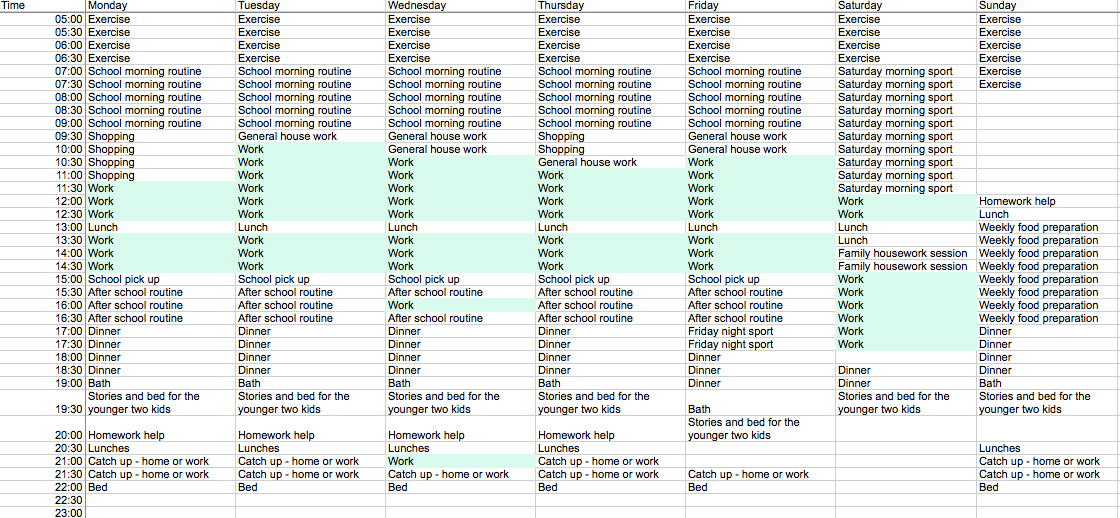
Effective weekly scheduling relies heavily on incorporating reliable reminders. This crucial aspect ensures that appointments, tasks, and deadlines are not missed, promoting greater efficiency and productivity. Proper reminder implementation is key to maximizing the benefits of a well-structured schedule.Understanding the various reminder types and their specific applications within a schedule is essential. Different tasks demand different levels of proactive notification, and choosing the right method can significantly impact the success of your weekly plan.
This section provides practical methods for setting reminders and explains how to tailor these methods to individual needs and tasks.
Methods for Setting Reminders
Reminders are vital for successfully managing tasks and appointments. They act as proactive alerts, ensuring that you are prepared for important events and deadlines. A variety of methods can be employed, from simple to sophisticated, depending on the specific requirements of the task.
- Notifications: Mobile device notifications, often integrated with calendar apps, are a common and convenient method. They offer timely alerts for scheduled appointments and tasks, providing a readily available visual and auditory cue. These notifications can be customized to specific events or timeframes, offering a flexible reminder system.
- Alarms: Alarms, often associated with specific times, are effective for tasks requiring precise timing. They can be set to ring on a device, alerting the user to perform a specific task at a pre-defined time. Alarms are particularly useful for tasks such as medication reminders or morning routines.
- Email Reminders: Email reminders, often sent automatically through scheduling software, serve as a secondary confirmation. They offer a record of the reminder and can be especially valuable for complex tasks or appointments that require more substantial documentation.
Choosing the Right Reminder Type
The effectiveness of a reminder hinges on selecting the most appropriate method for each task. A poorly chosen reminder type can lead to missed opportunities or unnecessary distractions. Consider the nature of the task when deciding on the best method.
| Reminder Type | Description | Effectiveness in Different Situations |
|---|---|---|
| Notifications | Visual and auditory alerts on a mobile device | Excellent for appointments, meetings, and general task reminders. Effective for time-sensitive tasks that don’t require exact timing. |
| Alarms | Sound alerts triggered at a specific time | Ideal for tasks requiring precise timing, such as taking medication, starting a workout, or preparing meals. Less effective for recurring events. |
| Email Reminders | Automated email alerts for appointments or tasks | Helpful for complex tasks, important deadlines, and situations requiring a written record. Can be used as a secondary confirmation for appointments or meetings. |
Setting Up Reminders in Scheduling Tools
Different scheduling tools offer various methods for setting reminders. Understanding the specific features of your chosen tool will streamline the process and maximize its potential.
- Google Calendar: Google Calendar allows users to set reminders via notifications, alarms, or email. Customization options are available for specific reminders, enabling users to tailor notifications to individual needs.
- Outlook Calendar: Outlook Calendar offers similar features, allowing users to select from notification types, alarm sounds, and email alerts for reminders.
- Other Calendar Apps: Many other calendar applications, both online and mobile, offer a similar range of reminder options. Familiarize yourself with the particular features of the app you use for the best results.
Optimizing Schedule for Specific Needs
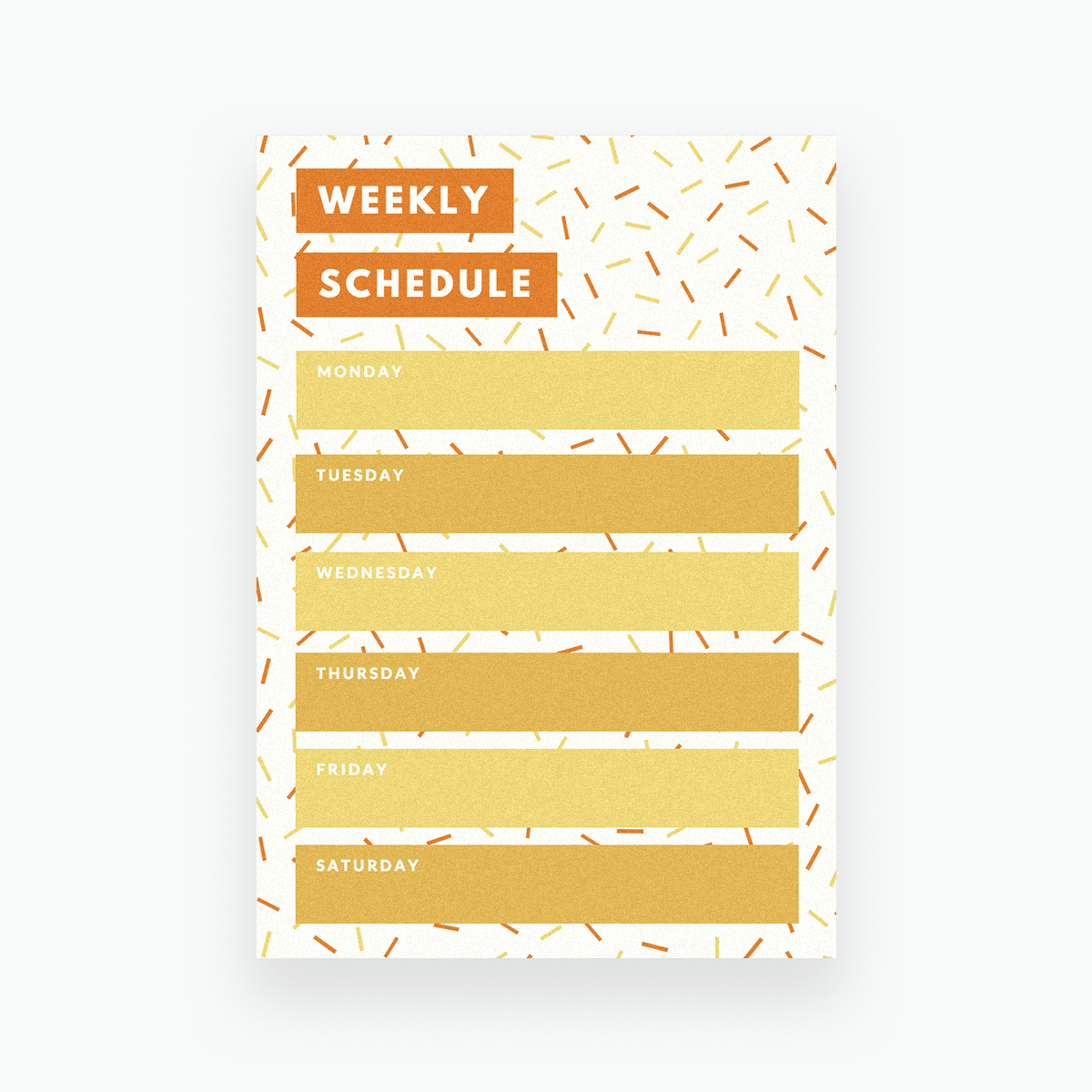
Creating a weekly schedule is a powerful tool, but its effectiveness hinges on its adaptability. A rigid schedule may not accommodate unexpected events or personal preferences, potentially leading to stress and reduced productivity. Understanding how to tailor your schedule to your unique circumstances is key to maximizing its benefits.A well-optimized schedule is not a static document; it’s a dynamic framework that adjusts to your evolving needs.
This flexibility is crucial for maintaining a healthy work-life balance and achieving personal goals. This section will explore strategies for adapting schedules to personal preferences, different work styles, unexpected events, personal time integration, and will provide an example schedule for a demanding professional with family responsibilities.
Adapting to Personal Preferences
Personal preferences play a significant role in schedule optimization. Understanding your energy levels, peak productivity times, and preferred work environment is vital for scheduling efficiency. For instance, if you are a morning person, scheduling demanding tasks early in the day can maximize productivity. Conversely, if you find your creativity flourishes later in the day, you can allocate those tasks to your afternoon or evening.
Prioritizing tasks based on your personal efficiency patterns allows for more focused work and a greater sense of accomplishment.
Adjusting for Different Work Styles
The nature of work significantly impacts schedule design. Remote work, for example, often requires more self-discipline and structure. A remote worker may need to incorporate specific time blocks for communication with colleagues and to maintain a clear separation between work and personal life. In-office work, on the other hand, necessitates scheduling meetings and collaborative activities. Understanding the nuances of each work style enables the development of a schedule that is not only effective but also conducive to a healthy work-life balance.
Managing Unexpected Events or Changes in Plans
Unexpected events and last-minute changes in plans are inevitable. Building flexibility into your schedule is crucial for managing these situations. A buffer of time can be allocated to deal with these situations without disrupting the entire schedule. This buffer could be a few minutes or even an entire hour, depending on the potential magnitude of disruptions. An adaptable approach allows you to react to unexpected events without compromising your overall schedule or causing significant delays.
Incorporating Personal Time and Relaxation
Personal time and relaxation are integral components of a healthy lifestyle. These activities are not merely desirable but essential for maintaining well-being and preventing burnout. Scheduling time for activities like exercise, hobbies, or simply relaxing can help reduce stress and increase overall productivity. These activities should be viewed as essential components of the schedule, not optional extras.
Example Schedule for a Demanding Professional with Family Responsibilities
This example schedule illustrates how a demanding work schedule can be balanced with family responsibilities. It assumes a professional with a demanding job and children.
| Time | Monday | Tuesday | Wednesday | Thursday | Friday | Saturday | Sunday |
|---|---|---|---|---|---|---|---|
| 7:00-8:00 AM | Family time | Family time | Family time | Family time | Family time | Family time | Family time |
| 8:00-9:00 AM | Work | Work | Work | Work | Work | Errands | Errands |
| 9:00-12:00 PM | Work meetings | Work meetings | Work | Work | Work | Errands/Chores | Errands/Chores |
| 12:00-1:00 PM | Lunch | Lunch | Lunch | Lunch | Lunch | Lunch | Lunch |
| 1:00-5:00 PM | Work | Work | Work | Work | Work | Family time | Family time |
| 5:00-6:00 PM | Family time/Chores | Family time/Chores | Family time/Chores | Family time/Chores | Family time/Chores | Family time | Family time |
| 6:00-8:00 PM | Family time | Family time | Family time | Family time | Family time | Free time/Relaxation | Free time/Relaxation |
| 8:00-9:00 PM | Chores | Chores | Chores | Chores | Chores | Free time/Relaxation | Free time/Relaxation |
This example demonstrates the potential for balancing professional obligations with personal time and family commitments. It highlights the importance of allocating specific time blocks for different activities. Remember to adjust this example to your unique needs and responsibilities.
Maintaining and Refining Schedules
Maintaining a consistent weekly schedule is crucial for productivity and well-being. However, sticking to a plan requires proactive adjustments and a willingness to adapt to changing circumstances. This section Artikels strategies for consistently following your schedule, reviewing and refining it, and ultimately, preventing burnout.
Strategies for Consistent Schedule Adherence
Following a weekly schedule requires discipline and proactive measures. A key strategy involves clearly defining tasks and prioritizing them. Breaking down large tasks into smaller, manageable steps can significantly improve the likelihood of completing them within the allocated time. Regular review of progress against the schedule can identify potential roadblocks and allow for timely adjustments. Moreover, utilizing a visual representation of the schedule, such as a wall calendar or a digital planner, can help maintain awareness and accountability.
Reviewing and Adjusting the Schedule
Regularly reviewing your schedule is essential for maintaining its effectiveness. This involves assessing the completed tasks, evaluating the allocated time for each task, and noting any discrepancies. Time management techniques, such as the Pomodoro Technique, can optimize task completion and help identify areas where adjustments are needed. The schedule should be viewed as a living document, allowing for modifications based on changing priorities or unforeseen circumstances.
This flexibility is vital for preventing frustration and maintaining motivation.
Adapting to Feedback and Performance
Analyzing performance against the schedule provides valuable insights for future improvements. Tracking the time spent on tasks, identifying bottlenecks, and analyzing the effectiveness of allocated time slots can lead to more efficient planning. For instance, if a particular task consistently takes longer than anticipated, adjusting the time allocation or breaking it down into smaller sub-tasks can enhance productivity.
Similarly, if a task is completed ahead of schedule, the freed-up time can be reallocated to other high-priority items or used for relaxation. Regular feedback from colleagues or supervisors can also be incorporated into the scheduling process.
Preventing Schedule Burnout and Maintaining Motivation
Maintaining a consistent schedule requires a proactive approach to preventing burnout. Overloading the schedule with tasks can lead to stress and reduced motivation. Incorporating breaks and time for personal activities is crucial for preventing exhaustion. Establishing a routine for personal well-being, such as exercise, mindfulness practices, or hobbies, is vital for managing stress and maintaining motivation. Regular reflection on progress and accomplishments, no matter how small, can boost morale and keep the motivation high.
Schedule flexibility, including a buffer time for unexpected events, is important.
Strategies for Maintaining a Weekly Schedule
| Strategy | Description | Potential Challenges |
|---|---|---|
| Prioritization and Task Breakdown | Breaking down large tasks into smaller, more manageable steps, and prioritizing tasks based on importance and deadlines. | Difficulty in prioritizing tasks, tendency to underestimate task duration. |
| Regular Schedule Review | Periodically evaluating the schedule to identify bottlenecks and areas for improvement. | Lack of time for review, reluctance to make adjustments. |
| Flexibility and Adaptability | Adjusting the schedule as needed to accommodate unexpected events or changing priorities. | Difficulty in letting go of planned activities, fear of disruption. |
| Time Management Techniques | Employing techniques like the Pomodoro Technique to optimize task completion and manage time effectively. | Difficulty in adapting to new techniques, initial resistance to change. |
| Well-being Integration | Incorporating breaks, personal activities, and relaxation into the schedule to prevent burnout. | Difficulty in allocating time for personal activities, feeling guilty about taking breaks. |
Epilogue
In conclusion, creating a successful weekly schedule with reminders is a journey of self-discovery and optimization. By understanding the benefits of structured scheduling, utilizing appropriate tools, and incorporating effective reminder systems, you can significantly improve your time management skills and reduce stress. This guide provides a robust framework for building a personalized weekly schedule that aligns with your individual needs and goals, fostering greater productivity and overall well-being.
Remember to adapt and refine your schedule regularly for optimal results.