Embarking on the journey of mastering your day begins with the art of task organization, a fundamental skill that unlocks unparalleled productivity and a sense of control. This guide delves into the core principles, explores effective methodologies, and highlights the digital tools that empower you to transform your daily responsibilities into a streamlined success story.
We will navigate through proven strategies, from understanding the psychological underpinnings of effective management to uncovering common pitfalls and essential system components. By the end, you will possess a comprehensive understanding of how to structure your day for maximum output, sharpen your focus, and adapt your approach for sustained efficiency.
Understanding the Core Principles of Daily Task Management

Effective task organization is not merely about creating a to-do list; it’s about cultivating a strategic approach that maximizes your output, minimizes stress, and allows for greater focus on what truly matters. By understanding the fundamental principles, you can build a system that supports your goals and enhances your overall daily efficiency. This foundational knowledge empowers you to move beyond simply reacting to demands and towards proactively shaping your day.The practice of managing daily responsibilities with a structured methodology offers profound psychological benefits.
It fosters a sense of control and accomplishment, reducing feelings of overwhelm and anxiety often associated with chaotic workloads. This structured environment can lead to increased motivation, improved decision-making, and a greater sense of purpose, as you clearly see progress being made towards your objectives.
Reasons for Effective Task Organization
There are several compelling reasons why dedicating time and effort to organizing your daily tasks is paramount for sustained productivity and well-being.
- Enhanced Focus and Concentration: A clear understanding of what needs to be done allows you to direct your mental energy more effectively, reducing distractions and improving the quality of your work.
- Reduced Stress and Overwhelm: Knowing your priorities and having a plan alleviates the mental burden of trying to remember everything and the anxiety of feeling constantly behind.
- Improved Time Management: Organized tasks provide a framework for allocating time realistically, preventing procrastination and ensuring that critical activities are addressed.
- Increased Sense of Accomplishment: Checking off completed tasks, even small ones, provides positive reinforcement and builds momentum, fostering a feeling of progress and satisfaction.
- Better Decision-Making: When tasks are clearly defined and prioritized, it becomes easier to make informed decisions about how to allocate your time and resources.
- Greater Adaptability: A well-organized system allows for flexibility. When unexpected tasks arise, you can more easily assess their impact and adjust your plan without derailing your entire day.
Psychological Benefits of Structured Task Management
The human mind thrives on order and clarity. Implementing a structured approach to daily responsibilities taps into these psychological needs, leading to significant improvements in mental state and performance.
- Sense of Control: When you are in charge of your tasks rather than them being in charge of you, it cultivates a powerful sense of agency and reduces feelings of helplessness.
- Reduced Cognitive Load: Offloading tasks from your memory to a trusted system frees up mental bandwidth, allowing you to think more clearly and creatively.
- Motivation and Momentum: The act of completing tasks, especially when visualized through a structured list or system, creates positive feedback loops that fuel motivation and encourage further action.
- Improved Self-Esteem: Consistently achieving goals, no matter how small, builds confidence and reinforces a positive self-image as someone who is capable and effective.
- Decreased Procrastination: A clear roadmap of what needs to be done, and when, directly combats the tendency to put off tasks.
Common Pitfalls in Task Organization
Many individuals struggle with effectively organizing their tasks due to common mistakes or overlooked aspects of the process. Recognizing these pitfalls is the first step toward avoiding them.
- Lack of Prioritization: Treating all tasks as equally important leads to wasted effort on low-impact activities and neglect of critical ones. This is often seen when individuals simply list everything without a clear hierarchy.
- Overly Ambitious Task Lists: Attempting to cram too many tasks into a single day leads to frustration, missed deadlines, and a feeling of failure, even if significant progress was made.
- Vague Task Descriptions: Tasks that are not clearly defined or actionable can lead to confusion, procrastination, and inefficient execution. For example, “Work on project” is less effective than “Draft introduction for Project X report.”
- Infrequent Review and Adjustment: Failing to regularly review and adapt your task list to changing circumstances or progress means your system quickly becomes outdated and ineffective.
- Perfectionism: Getting bogged down in making tasks perfect rather than completing them can be a significant time sink and a barrier to progress.
- Ignoring Energy Levels: Not considering personal energy fluctuations throughout the day can lead to attempting complex tasks when energy is low, resulting in poor performance and increased frustration.
- Lack of a Centralized System: Using multiple scattered notes, emails, and mental reminders makes it impossible to get a clear overview and increases the likelihood of tasks falling through the cracks.
Essential Components of a Robust Daily Task Management System
A truly effective system for managing daily tasks is built upon several interconnected components that work together to provide clarity, structure, and actionable insights.
1. A Clear Prioritization Framework
The ability to distinguish between urgent, important, and less critical tasks is fundamental. Without a clear way to prioritize, even the most organized list can lead to inefficiency.A common and effective framework is the Eisenhower Matrix, which categorizes tasks based on their urgency and importance.
| Quadrant 1: Urgent & Important | Quadrant 2: Important, Not Urgent | Quadrant 3: Urgent, Not Important | Quadrant 4: Not Urgent, Not Important |
|---|---|---|---|
| Do first (crises, deadlines) | Schedule (planning, prevention, relationships) | Delegate (interruptions, some meetings) | Eliminate (time wasters, trivial tasks) |
“The key is not to prioritize what’s on your schedule, but to schedule your priorities.”
Stephen Covey
2. Actionable and Specific Task Definitions
Tasks should be clearly defined and phrased in a way that makes their execution straightforward. This often involves using action verbs and specifying the desired outcome.For instance, instead of “Marketing,” a more actionable task would be “Draft social media post for new product launch.”
3. Time Blocking or Scheduling
Allocating specific time slots for tasks, known as time blocking, ensures that important activities are given dedicated attention and prevents them from being perpetually pushed aside. This also helps in realistically assessing what can be accomplished in a given day.
4. Regular Review and Adaptation
A daily task management system is not static. It requires consistent review, typically at the beginning and end of each day, to update progress, reschedule unfinished items, and incorporate new tasks. This ensures the system remains relevant and effective.
5. A Centralized Capture System
All tasks, ideas, and commitments should be captured in a single, reliable location. This could be a digital app, a notebook, or a planner. The key is consistency, ensuring nothing is lost or forgotten.
6. Batching Similar Tasks
Grouping similar tasks together and completing them in one dedicated block of time can significantly improve efficiency by minimizing context switching and leveraging momentum. Examples include responding to emails, making phone calls, or running errands.
Popular Methods for Task Organization
Moving beyond the foundational principles, several well-established methodologies offer practical frameworks for organizing and managing daily tasks. These techniques cater to different work styles and preferences, providing structured approaches to enhance focus, prioritization, and overall productivity. Exploring these popular methods can help you identify the best fit for your personal workflow.Understanding these methods involves recognizing their unique strengths and how they address common challenges in task management, such as procrastination, overwhelm, and inefficient time allocation.
By adopting one or a combination of these approaches, individuals can gain greater control over their schedules and achieve their goals more effectively.
Pomodoro Technique vs. Time Blocking
Both the Pomodoro Technique and time blocking are highly effective strategies for structuring work and improving focus, but they approach task management from different angles. The Pomodoro Technique emphasizes focused bursts of work interspersed with short breaks, promoting sustained concentration and preventing burnout. Time blocking, on the other hand, involves pre-scheduling specific blocks of time for particular tasks or activities, ensuring that dedicated time is allocated to important items.The Pomodoro Technique operates on a simple cycle: work for a set period (typically 25 minutes), followed by a short break (5 minutes).
After several cycles, a longer break is taken. This method is excellent for tackling tasks that require deep concentration and for individuals who struggle with maintaining focus over extended periods. It helps in breaking down large tasks into manageable segments and provides a clear signal to switch tasks or take a rest, thereby combating mental fatigue.Time blocking, conversely, requires a more proactive planning approach.
It involves looking at your entire day or week and assigning specific time slots to each task. For instance, you might block out 9:00 AM to 10:30 AM for “Respond to emails,” 10:30 AM to 12:00 PM for “Project X development,” and so on. This method is particularly useful for ensuring that high-priority tasks receive adequate attention and for visualizing how your time is being spent.
It also helps in setting realistic expectations for what can be accomplished within a given timeframe.While the Pomodoro Technique focuses on the intensity and rhythm of work, time blocking focuses on the allocation of specific durations. A key difference lies in flexibility: Pomodoro is more adaptable to unexpected interruptions or the natural ebb and flow of energy, whereas time blocking, if rigidly adhered to, can sometimes feel restrictive.
However, many individuals find success by integrating elements of both, using Pomodoro intervals within pre-scheduled time blocks.
The Eisenhower Matrix for Task Prioritization
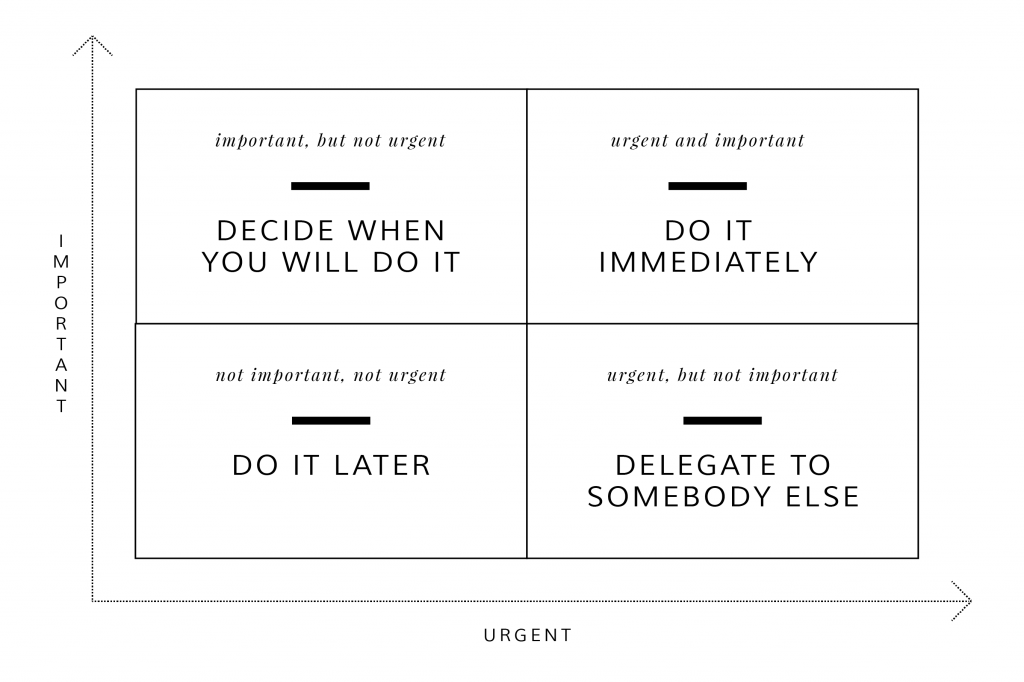
The Eisenhower Matrix, also known as the Urgent-Important Matrix, is a powerful tool for prioritizing tasks based on their urgency and importance. It helps individuals distinguish between what needs immediate attention and what can be delegated, scheduled, or even eliminated. This framework is rooted in the idea that not all tasks are created equal, and effective prioritization is key to maximizing productivity and achieving long-term goals.The matrix divides tasks into four quadrants:
- Quadrant 1: Urgent and Important (Do First): These are tasks that require immediate attention and are crucial for achieving your goals. Examples include crises, pressing deadlines, and critical problems.
- Quadrant 2: Important, but Not Urgent (Schedule): These tasks are vital for your long-term success and personal growth but do not require immediate action. They often involve planning, relationship building, prevention, and self-improvement. Proactively dedicating time to these tasks prevents them from becoming urgent later.
- Quadrant 3: Urgent, but Not Important (Delegate): These tasks demand immediate attention but do not significantly contribute to your goals. They are often distractions or tasks that others could handle. Examples include some interruptions, certain meetings, and other people’s priorities.
- Quadrant 4: Not Urgent and Not Important (Delete): These tasks are time-wasters that offer little to no value. They should be eliminated to free up time for more meaningful activities. Examples include excessive social media browsing, unimportant emails, and busywork.
Applying the Eisenhower Matrix involves a systematic process of evaluating each task and assigning it to the appropriate quadrant. This requires a clear understanding of your goals and values to accurately assess the importance of each activity. By consistently using this matrix, you can shift your focus from being reactive to proactive, ensuring that you are investing your time and energy in activities that truly matter.
The GTD (Getting Things Done) Methodology
The Getting Things Done (GTD) methodology, developed by David Allen, is a comprehensive system for organizing and tracking tasks, projects, and ideas to achieve a state of “mind like water.” It emphasizes capturing all incoming information and commitments, processing them systematically, and organizing them into actionable lists. The core principle is to get everything out of your head and into a trusted system, thereby freeing up mental bandwidth for focused work.GTD’s core workflows involve several key steps:
- Capture: This involves collecting all your ideas, tasks, appointments, and commitments into an “inbox” – a physical tray, an email folder, or a digital note. The goal is to have a single place to gather everything that demands your attention.
- Clarify: Once captured, each item needs to be processed. This means asking yourself: “What is it?” and “Is it actionable?” If it’s not actionable, you can trash it, incubate it for later, or file it as reference. If it is actionable, you decide on the “next action.”
- Organize: Actionable items are then organized into specific categories. This includes creating lists for:
- Projects: Any outcome requiring more than one step.
- Next Actions: The physical, visible activity that needs to be done to move a project forward. These are often categorized by context (e.g., @computer, @calls, @home).
- Waiting For: Items you’ve delegated or are awaiting a response on.
- Someday/Maybe: Ideas or projects you might want to pursue in the future but are not committed to now.
- Calendar: For time-specific appointments and tasks.
- Reflect: Regular reviews are crucial. This includes daily reviews of your calendar and next actions, weekly reviews to process your inbox, review your projects, and update your lists. This ensures your system remains current and relevant.
- Engage: Based on your organized lists and current context, you choose what to work on. This could be based on the time available, energy levels, or priority.
The strength of GTD lies in its systematic approach to reducing mental clutter and creating a clear path forward for every commitment. By diligently following these workflows, individuals can build a reliable system that supports their productivity and reduces stress.
Implementing the Kanban Method for Personal Task Tracking
The Kanban method, originating from manufacturing, is a visual system for managing work as it moves through a process. For personal task tracking, it translates into a simple yet powerful board that visualizes your workflow, making it easy to see what needs to be done, what is in progress, and what has been completed. This visual approach helps in managing workflow, identifying bottlenecks, and ensuring a steady pace of task completion.A basic Kanban board for personal task tracking can be designed with three core columns:
| To Do | In Progress | Done |
|---|---|---|
| This column lists all tasks that are waiting to be started. Each task is represented by a card. When you have an idea or a task assigned to you, it begins here. Examples: “Draft project proposal,” “Research new software,” “Schedule dentist appointment.” | When you begin working on a task, you move its card to the “In Progress” column. This column provides a clear visual of what you are currently focused on. It’s important to limit the number of tasks in this column (a concept known as “WIP limit” or Work In Progress limit) to prevent multitasking and maintain focus. Examples: “Writing the introduction for the proposal,” “Analyzing software features,” “Calling the dentist’s office.” | Once a task is completed, its card is moved to the “Done” column. This column serves as a record of your accomplishments and provides a sense of progress and satisfaction. Examples: “Project proposal drafted,” “Software research complete,” “Dentist appointment booked.” |
To implement this:
- You can use a physical whiteboard with sticky notes, a large sheet of paper, or digital tools like Trello, Asana, or Microsoft Planner.
- Each task is written on a separate card or sticky note.
- When you start working on a task, move its card from “To Do” to “In Progress.”
- When you finish a task, move its card from “In Progress” to “Done.”
The visual nature of the Kanban board makes it easy to see the flow of work and identify where tasks might be getting stuck. By limiting the number of items in the “In Progress” column, you encourage yourself to finish tasks before starting new ones, which can significantly improve efficiency and reduce the feeling of being overwhelmed.
Digital Tools and Applications for Task Management
In today’s fast-paced world, leveraging technology can significantly enhance our ability to organize and manage daily tasks, leading to improved efficiency and productivity. Digital tools offer a dynamic and accessible way to keep track of responsibilities, deadlines, and progress, often surpassing the limitations of traditional paper-based systems. This section explores various digital solutions and how to best utilize them for optimal daily task management.The digital landscape offers a diverse array of tools designed to cater to different task management needs.
These applications range from simple to-do list creators to comprehensive project management suites, each offering unique features to streamline workflows. Understanding these categories can help individuals select the most appropriate tools for their specific requirements.
Popular Digital Tools for Task Management
To assist in organizing daily tasks, a variety of digital tools are available, each with distinct functionalities. These tools can be broadly categorized to help users identify solutions that align with their organizational style and complexity of tasks.
- To-Do List Applications: These are the most straightforward tools, focusing on creating, prioritizing, and tracking individual tasks. They are ideal for personal task management and simple daily planning. Examples include Todoist, Microsoft To Do, and Google Tasks.
- Project Management Software: These platforms are designed for more complex undertakings, allowing for task breakdown, team collaboration, resource allocation, and progress tracking over extended periods. They are suitable for managing larger projects or multiple concurrent initiatives. Popular options include Asana, Trello, Monday.com, and Jira.
- Note-Taking Applications with Task Features: Many advanced note-taking apps incorporate robust task management capabilities, allowing users to integrate notes, ideas, and actionable items within a single environment. Evernote and Notion are prime examples, offering flexibility in how tasks are linked to broader information.
- Calendar Applications: While primarily used for scheduling appointments, modern calendar applications can also serve as powerful task management tools when integrated effectively. They allow for time-blocking tasks and visualizing commitments. Google Calendar, Outlook Calendar, and Apple Calendar are widely used.
Advantages of Digital Task Management Systems
The transition from paper-based task lists to digital systems offers numerous benefits that contribute to enhanced efficiency and a more organized approach to daily responsibilities. These advantages stem from the inherent capabilities of digital platforms.Digital task management systems provide a level of flexibility, accessibility, and integration that is difficult to replicate with traditional methods. They empower users with features that promote better planning, execution, and review of their daily workload.
- Accessibility and Synchronization: Digital tools can be accessed from multiple devices (desktops, laptops, smartphones, tablets) and often sync data across them, ensuring that your task list is always up-to-date and available wherever you are.
- Enhanced Organization and Categorization: Digital platforms allow for detailed categorization, tagging, and prioritization of tasks, making it easier to manage complex workloads and filter information efficiently. This can include setting due dates, reminders, and recurring tasks.
- Collaboration Features: For team-based projects, digital tools facilitate seamless collaboration, task assignment, progress sharing, and communication, reducing the need for constant meetings and emails.
- Automation and Reminders: Digital systems can automate repetitive tasks and provide timely reminders for deadlines, preventing tasks from being overlooked and helping to maintain momentum.
- Data Analysis and Reporting: Many advanced tools offer insights into productivity, task completion rates, and time spent on activities, which can be invaluable for identifying areas for improvement.
- Reduced Clutter and Environmental Impact: Moving tasks to a digital format significantly reduces paper waste and the physical clutter associated with notebooks and sticky notes.
Leveraging Calendar Applications for Task Integration
Calendar applications are more than just tools for scheduling appointments; they can be powerful allies in daily task management when utilized strategically. By integrating tasks into your calendar, you create a visual roadmap for your day, ensuring that important to-dos are allocated dedicated time.The key to effectively using calendars for task management lies in treating tasks as appointments. This approach helps to combat the tendency to overcommit and provides a realistic overview of what can be accomplished within a given timeframe.
- Time Blocking: Allocate specific blocks of time in your calendar for completing particular tasks. This method, known as time blocking, ensures that tasks receive the focused attention they require and prevents them from being pushed aside by less critical activities. For example, dedicate 9:00 AM to 10:30 AM for “Draft Project Proposal.”
- Setting Task Deadlines as Events: For tasks with firm deadlines, create calendar events that mirror these deadlines. This serves as a visual cue and reminder of when the task needs to be completed.
- Recurring Tasks: Utilize the recurring event feature for daily, weekly, or monthly tasks that need to be performed consistently. This automates the scheduling of routine responsibilities, such as “Review daily analytics” every morning.
- Color-Coding: Assign different colors to various types of tasks or projects within your calendar. This visual differentiation makes it easier to quickly scan your schedule and understand the distribution of your commitments. For instance, use blue for work tasks, green for personal errands, and red for urgent items.
- Integration with To-Do Lists: Many calendar applications can integrate directly with dedicated to-do list apps. This allows tasks from your to-do list to appear as events in your calendar, providing a unified view of your schedule and responsibilities.
Best Practices for Selecting and Customizing Digital Task Management Tools
Choosing the right digital tool is crucial for effective task management, and what works for one person may not be ideal for another. The best approach involves understanding your personal workflow and preferences, then selecting and customizing a tool to fit those needs.A well-chosen and personalized task management system can become an indispensable part of your daily routine, significantly boosting your productivity and reducing stress.
The process of selection and customization should be an ongoing one, adapting as your needs evolve.
- Assess Your Needs: Before diving into options, consider the complexity of your tasks, whether you work alone or in a team, and your preferred level of detail. Are you looking for a simple checklist or a comprehensive project planner?
- Prioritize Simplicity and User-Friendliness: A tool that is overly complicated will likely lead to frustration and underutilization. Opt for an interface that is intuitive and easy to navigate. Many tools offer free trials, allowing you to test them before committing.
- Consider Integration Capabilities: If you use other digital tools, such as email clients, calendars, or cloud storage, look for task management applications that can integrate with them. This creates a more cohesive digital ecosystem.
- Mobile Accessibility: Ensure the tool has a robust mobile application if you frequently manage tasks on the go. The ability to add, edit, and check off tasks from your smartphone is invaluable.
- Customization Options: Look for tools that allow you to customize features to your liking. This might include creating custom tags, fields, workflows, or notification settings. For example, if you prefer to group tasks by client, ensure the tool supports custom project or client tags.
- Start Small and Iterate: Once you’ve chosen a tool, begin by implementing a few key features. As you become more comfortable, gradually explore and integrate more advanced functionalities. Regularly review how you are using the tool and make adjustments as needed.
- Regular Review and Refinement: Periodically, take time to assess if your chosen tool is still meeting your needs. As your responsibilities or work style change, you may need to switch to a different application or adjust your current system’s configuration.
Structuring Your Day for Maximum Efficiency
To truly harness the power of task management, it’s essential to translate principles into actionable daily routines. This involves not only planning what to do but also when and how to do it, creating a framework that supports sustained productivity and well-being. By consciously structuring your day, you can proactively manage your energy, focus, and time, leading to a more efficient and fulfilling experience.This section delves into practical methods for building an efficient daily structure.
We will explore creating a sample schedule, outlining a daily planning process, techniques for dissecting large projects, and the crucial integration of breaks to maintain optimal performance.
Sample Daily Schedule for Task Management
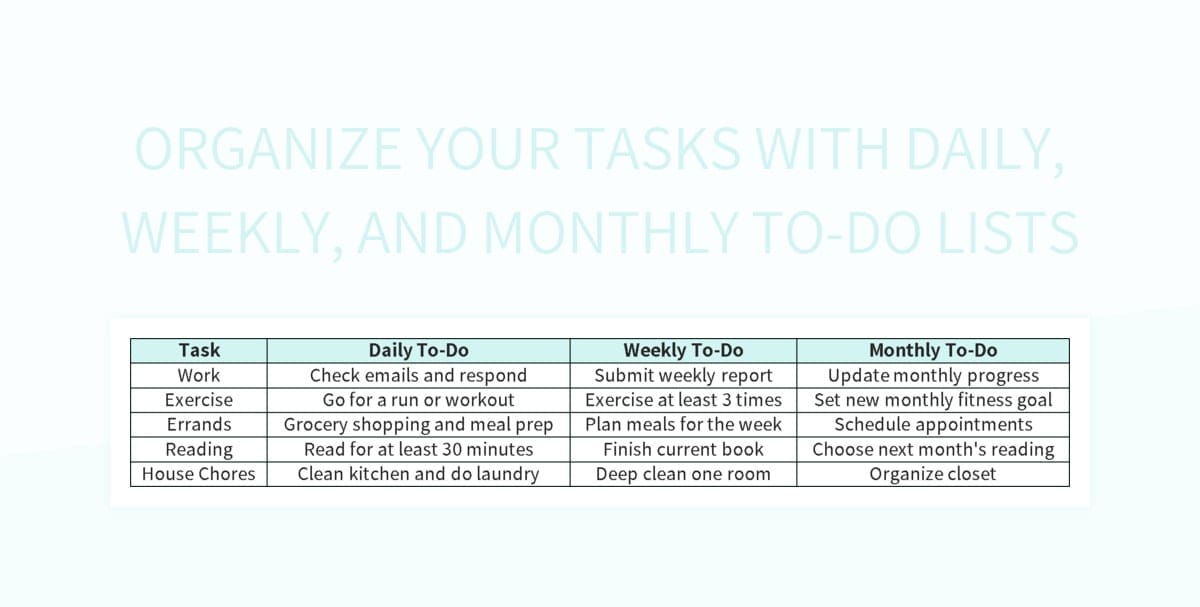
A well-structured daily schedule acts as a roadmap, guiding you through your tasks with clarity and purpose. It helps in allocating appropriate time slots, prioritizing activities, and tracking progress, thereby minimizing wasted time and maximizing output. The following table provides an example of how a day can be organized to incorporate task management principles, promoting efficiency and focus.
| Time | Task | Priority | Status |
|---|---|---|---|
| 7:00 AM – 7:30 AM | Morning Routine (Hydration, Light Exercise) | High | Completed |
| 7:30 AM – 8:00 AM | Review Daily Plan & Prioritize | High | Completed |
| 8:00 AM – 9:30 AM | Deep Work Session 1: Project Alpha – Report Writing | High | In Progress |
| 9:30 AM – 9:45 AM | Short Break (Stretch, Hydrate) | High | Completed |
| 9:45 AM – 11:00 AM | Email & Communication Management | Medium | In Progress |
| 11:00 AM – 12:30 PM | Deep Work Session 2: Project Beta – Data Analysis | High | In Progress |
| 12:30 PM – 1:30 PM | Lunch Break | High | Completed |
| 1:30 PM – 2:30 PM | Team Meeting: Project Gamma Update | Medium | Scheduled |
| 2:30 PM – 3:30 PM | Task Follow-ups & Administrative Work | Medium | Pending |
| 3:30 PM – 3:45 PM | Short Break (Mindfulness Exercise) | High | Completed |
| 3:45 PM – 5:00 PM | Task Batching: Prepare for Tomorrow’s Meetings | Low | Pending |
| 5:00 PM – 5:30 PM | Daily Review & Plan for Tomorrow | High | Pending |
Daily Task Planning Procedure
A consistent daily planning ritual is fundamental to effective task management. This process ensures that your day starts with clarity and intention, setting you up for focused execution. Implementing a structured approach to daily planning minimizes the chances of feeling overwhelmed or losing track of your objectives.The following step-by-step procedure Artikels how to effectively plan your tasks at the beginning of each day:
- Review Your Master Task List and Calendar: Begin by looking at your overarching list of tasks and your scheduled appointments for the day. This provides a comprehensive view of your commitments.
- Identify Your Top 1-3 Priorities: Based on your goals and deadlines, determine the most critical tasks that absolutely need to be accomplished today. These are your “must-dos.”
- Estimate Time Needed for Each Task: For each task, realistically assess how much time you anticipate it will take to complete. Be generous with your estimates to account for unforeseen interruptions.
- Block Out Time in Your Schedule: Allocate specific time slots in your calendar for your high-priority tasks, treating them like appointments. Also, schedule time for lower-priority tasks and administrative work.
- Incorporate Buffer Time: Add short periods of buffer time between tasks or blocks of work to allow for transitions, unexpected issues, or brief moments of reflection.
- Plan for Breaks: Intentionally schedule short breaks throughout your day to rest and recharge. This is crucial for maintaining focus and preventing burnout.
- Prepare for the Next Day: At the end of your workday, take a few minutes to review what was accomplished and make a preliminary plan for the following day. This can significantly reduce morning decision fatigue.
Breaking Down Large Tasks
Large, complex tasks can often feel daunting, leading to procrastination and a sense of being overwhelmed. The key to tackling these effectively is to break them down into smaller, more manageable sub-tasks. This process not only makes the overall objective seem less intimidating but also provides a clear, actionable path forward, allowing for a sense of progress with each completed sub-task.Here are methods for breaking down large tasks into smaller, manageable sub-tasks:
- Identify Major Milestones: For a large project, first Artikel the key phases or significant achievements. These become your primary sub-tasks. For instance, if the large task is “Launch New Website,” milestones might include “Design Wireframes,” “Develop Frontend,” “Build Backend,” “Content Creation,” and “Testing.”
- Deconstruct Milestones into Actionable Steps: Once you have your milestones, break each one down further into specific, concrete actions. For the milestone “Design Wireframes,” sub-tasks could be “Research Competitor Websites,” “Sketch Initial Layouts,” “Create User Flow Diagrams,” and “Finalize Wireframe Designs.”
- Define Deliverables for Each Sub-task: For every small task, clearly state what the tangible output or result will be. This clarifies expectations and makes it easier to mark a task as complete. For “Research Competitor Websites,” the deliverable might be a “Document of Key Features and Design Elements from 5 Competitors.”
- Estimate Time and Resources for Each Sub-task: Assign a realistic time estimate to each small task and identify any resources (tools, information, or assistance) that might be needed. This aids in scheduling and resource allocation.
- Sequence Sub-tasks Logically: Arrange the sub-tasks in a logical order, considering dependencies. Some tasks must be completed before others can begin. For example, “Develop Frontend” cannot start until “Finalize Wireframe Designs” is complete.
- Use a Task Management Tool: Employ digital tools or even a simple spreadsheet to list and track these sub-tasks. This visual representation makes the breakdown clear and helps in monitoring progress.
Incorporating Breaks and Rest
Sustained productivity is not about working continuously but about working smartly, which includes strategic rest. Integrating regular breaks and sufficient rest into your daily workflow is not a luxury but a necessity for preventing burnout, maintaining cognitive function, and ensuring long-term efficiency. Neglecting rest can lead to decreased focus, increased errors, and diminished creativity.Strategies for incorporating breaks and rest into your daily workflow include:
- The Pomodoro Technique: This popular method involves working in focused bursts, typically 25 minutes long, followed by a short break of 5 minutes. After four “pomodoros,” take a longer break of 15-30 minutes. This structured approach helps maintain high levels of concentration and prevents mental fatigue.
- Scheduled “Deep Work” Blocks with Built-in Pauses: When engaging in demanding tasks that require sustained focus, schedule longer work blocks (e.g., 60-90 minutes) but deliberately plan short, 5-10 minute breaks within these blocks. Stand up, stretch, walk around, or simply close your eyes for a moment.
- Active Breaks: Instead of passively scrolling through your phone during breaks, opt for activities that re-energize you. This could include a short walk outdoors, light stretching, listening to uplifting music, or engaging in a brief mindfulness or meditation exercise.
- Mindful Transitions: Use the transition periods between tasks as mini-breaks. Instead of rushing from one activity to the next, take a minute to consciously shift your focus. This could involve taking a few deep breaths or mentally reviewing the next task.
- Regular Meal and Hydration Breaks: Ensure you take proper breaks for meals and stay adequately hydrated throughout the day. These are fundamental biological needs that directly impact your energy levels and cognitive performance.
- End-of-Day Wind-Down: Dedicate the last portion of your workday to reviewing your progress and planning for the next day, followed by a clear separation from work. This allows your mind to switch off and prepare for rest.
- Prioritize Sleep: While not a daily in-the-moment strategy, adequate sleep is the foundation of all productivity. Aim for 7-9 hours of quality sleep each night to ensure your brain and body are fully restored.
Prioritization and Focus Techniques

Mastering your daily tasks hinges on your ability to discern what truly matters and to dedicate your attention effectively. This section delves into strategies that empower you to make informed decisions about your workload and maintain unwavering concentration. By implementing these techniques, you can transform a potentially overwhelming list of to-dos into a manageable and productive flow.Prioritization is the art of identifying the most crucial tasks and ensuring they receive the attention they deserve.
Without a clear sense of priority, it’s easy to get bogged down in less important activities, leaving essential work undone. Focus, on the other hand, is the discipline of concentrating your mental energy on the task at hand, minimizing interruptions and maximizing output.
Prioritization Frameworks
Effective prioritization frameworks provide structured approaches to evaluating and ranking tasks. These systems help to clarify the relative importance and urgency of different activities, ensuring that your efforts are directed towards the most impactful goals.One widely recognized framework is the MoSCoW method. This mnemonic stands for:
- Must have: These are non-negotiable tasks that are critical for success. If these are not completed, the project or day’s objective will be considered a failure.
- Should have: These are important tasks that contribute significantly to the goal, but the project or day can still succeed without them, albeit with a less optimal outcome.
- Could have: These are desirable tasks that would be beneficial if time and resources allow, but their absence will have minimal impact.
- Won’t have: These are tasks that are explicitly excluded from the current scope or timeline, either because they are not a priority or are deemed too costly or time-consuming.
Applying MoSCoW to daily tasks involves a quick assessment of your to-do list. For instance, if you have a report due today, that’s a “Must have.” Responding to non-urgent emails might be a “Should have,” while researching a new tool for future use could be a “Could have.” Tasks that are completely unrelated to your immediate goals would be “Won’t have.”
Distraction Identification and Elimination
Distractions are a significant impediment to daily efficiency, diverting your attention and fragmenting your focus. Identifying the common sources of these interruptions is the first step towards mitigating their impact and reclaiming your productive time.Common distractions can be broadly categorized as:
- Internal distractions: These arise from within, such as wandering thoughts, worries, or the urge to check social media.
- External distractions: These originate from your environment, including notifications from your phone or computer, colleagues interrupting, or noisy surroundings.
To combat these, consider implementing strategies like:
- Time blocking for focused work: Dedicate specific, uninterrupted blocks of time for your most important tasks.
- Notification management: Turn off non-essential notifications on your devices during these focus periods.
- Creating a dedicated workspace: If possible, establish a quiet and organized area free from visual clutter and potential interruptions.
- Setting boundaries: Communicate to colleagues or family members when you need uninterrupted time to concentrate.
Task Batching for Improved Efficiency
Task batching is a productivity technique that involves grouping similar tasks together and completing them in a single, dedicated block of time. This method leverages the cognitive principle of “context switching,” which is the mental effort required to shift from one type of task to another. By reducing context switching, batching can lead to significant gains in efficiency and reduce mental fatigue.Examples of tasks that can be effectively batched include:
- Email management: Instead of checking emails sporadically throughout the day, set aside specific times (e.g., morning, midday, end of day) to process your inbox.
- Phone calls: Group all your necessary phone calls into one or two blocks to avoid constant interruptions.
- Administrative tasks: Handle all your filing, data entry, or expense reporting at once.
- Creative work: Dedicate a block of time solely for brainstorming, writing, or design, free from the demands of other task types.
By dedicating a specific period to a single category of work, your brain can remain in a similar cognitive state, allowing for smoother execution and less time wasted on reorienting yourself.
Maintaining Focus and Resisting Multitasking
The allure of multitasking is strong, often creating an illusion of productivity. However, research consistently shows that true multitasking is inefficient and leads to more errors. The key to daily efficiency lies in single-tasking and employing techniques to maintain deep focus on the current activity.To cultivate sustained focus:
- The Pomodoro Technique: This popular method involves working in focused bursts (typically 25 minutes) followed by short breaks (5 minutes). After several cycles, a longer break is taken. This structured approach helps to maintain energy levels and prevent burnout.
- Mindfulness and single-tasking: Consciously direct your attention to the task at hand, acknowledging when your mind wanders and gently bringing it back. Practice doing one thing at a time, fully immersing yourself in it.
- Eliminate multitasking temptations: Close unnecessary tabs on your browser, silence your phone, and inform others of your need for concentration.
- Visualize completion: Imagine the satisfaction of completing the current task. This can serve as a powerful motivator to stay on track.
By actively employing these prioritization and focus techniques, you can gain a significant advantage in managing your daily workload and achieving your objectives with greater ease and effectiveness.
Adapting and Refining Your Task Management System
As you implement and utilize your chosen task management methods, it’s crucial to recognize that no system is a one-size-fits-all solution, nor is it static. The journey to peak daily efficiency is an iterative process, demanding ongoing evaluation and thoughtful adjustments. This section will guide you through the essential steps of reviewing your current practices, adapting to evolving circumstances, and building a robust feedback loop for continuous improvement.Effectively managing your tasks is not about finding a perfect system and sticking to it rigidly, but rather about cultivating a flexible and responsive approach.
By regularly assessing what works and what doesn’t, and by remaining open to change, you empower yourself to maintain and even enhance your daily productivity over time.
Weekly Review and Reflection
Dedicate time at the end of each week to critically assess the effectiveness of your task organization strategies. This practice allows you to identify successes, pinpoint areas of friction, and gather valuable insights for future planning.To conduct a thorough weekly review, consider the following actions:
- Review Accomplishments: Look back at your task list and identify what you successfully completed. Celebrate these wins, no matter how small, as they reinforce positive habits.
- Analyze Unfinished Tasks: Examine tasks that were not completed. Were they too ambitious for the allotted time? Did unexpected interruptions occur? Was the prioritization incorrect? Understanding the reasons behind unfinished tasks is key to preventing them in the future.
- Assess Time Allocation: Compare the time you estimated for tasks with the actual time spent. This helps in developing more realistic time-blocking and estimation skills.
- Evaluate Tool Usage: Consider if the digital tools or methods you’re using are genuinely supporting your workflow or creating additional complexity.
- Note Energy Levels and Focus: Reflect on when you felt most productive and when your energy dipped. This can inform how you schedule demanding tasks.
Adjusting to Changing Priorities and Workload
Life is dynamic, and your task management system must be adaptable to remain effective. Shifting priorities, unexpected urgent requests, or a sudden increase in workload are common occurrences that require a nimble approach to task planning.Strategies for adjusting your task management approach include:
- Re-prioritization Frameworks: When new priorities emerge, use established frameworks like the Eisenhower Matrix (Urgent/Important) or MoSCoW (Must have, Should have, Could have, Won’t have) to quickly re-evaluate your existing task list. This ensures that your focus remains on what truly matters.
- Buffer Time Integration: Proactively build buffer time into your schedule. This “slack” can absorb unexpected tasks or allow for deeper dives into complex items without derailing your entire day. A good rule of thumb is to aim for your schedule to be no more than 80% full.
- Task Delegation or Deferral: For tasks that are not critical or cannot be handled immediately due to a heavy workload, consider delegating them if possible or consciously deferring them to a later date. Clearly communicate any deferrals to relevant stakeholders.
- Daily “Top 3” Re-evaluation: At the beginning of each day, or even mid-day if circumstances change rapidly, revisit your most important tasks and adjust your “Top 3” if necessary. This ensures you are always working on the most impactful items.
The Importance of Flexibility in Task Planning
Flexibility is not a sign of disorganization; rather, it is a hallmark of an intelligent and resilient task management system. Rigid adherence to a plan that no longer serves your current needs can lead to frustration and decreased productivity.Incorporating flexibility into your task planning involves:
- Embracing the “Good Enough” Principle: Not every task needs to be executed with absolute perfection. Sometimes, completing a task to a satisfactory standard and moving on is more efficient than striving for unattainable perfection.
- Time Boxing with Grace: While time boxing is a powerful tool, allow for some leeway. If a task is proving more complex than anticipated, it’s often better to extend its time box slightly rather than abandon it or rush through it poorly.
- Building in Spontaneity Blocks: Allocate small blocks of time in your schedule for unstructured thinking, creative problem-solving, or simply addressing emergent issues. This prevents your day from feeling overly regimented and allows for organic progress.
- Regular Check-ins with Your Schedule: Instead of setting a rigid schedule for the entire week, consider planning in more detail for the next 1-2 days and reviewing and adjusting the rest of the week as you go.
A Simple Feedback Loop for Continuous Improvement
To ensure your task management system evolves with you, establish a simple yet effective feedback loop. This cycle of assessment, adjustment, and re-assessment is the engine of continuous improvement.The feedback loop can be structured as follows:
- Plan: At the start of your week or day, define your tasks and priorities using your chosen methods.
- Execute: Work through your tasks, applying your strategies.
- Review: At the end of the defined period (daily or weekly), assess what went well and what could be improved (as detailed in the “Weekly Review and Reflection” section).
- Adapt: Based on your review, make specific, actionable adjustments to your planning, prioritization, or execution strategies for the next cycle.
“The only constant in life is change, and a flexible system is one that can adapt to it.”
This iterative process, when consistently applied, transforms your task management from a rigid set of rules into a dynamic tool that actively supports your journey towards greater daily efficiency.
Wrap-Up
In conclusion, the path to daily efficiency is not a rigid prescription but a dynamic process of continuous refinement. By embracing the principles of task organization, leveraging powerful tools, and cultivating a focused mindset, you can effectively manage your workload, minimize stress, and consistently achieve your goals. This exploration provides the framework; your commitment to adapting and optimizing will forge a truly efficient and fulfilling daily rhythm.